向量数据库简介
向量数据库是用于高效计算和管理大量 向量数据 的解决方案。 向量数据库是一种专门用于 存储和检索向量数据(embedding) 的数据库系统。 它与传统的基于关系模型的数据库不同,它主要关注的是 向量数据的特性和相似性。
在向量数据库中,数据被表示为向量形式,每个向量代表一个数据项。 这些向量可以是数字、文本、图像或其他类型的数据。 向量数据库使用高效的 索引 和 查询 算法来加速向量数据的存储和检索过程。
向量数据库原理及优势
向量数据库中的 数据以向量作为基本单位,对向量进行 存储、处理 及 检索。 向量数据库通过计算与目标向量的 余弦距离、点积、Squared L2 等获取与目标向量的相似度。 当处理大量甚至海量的向量数据时,向量数据库 索引 和 查询 算法的效率明显高于传统数据库。
主流向量数据库
- Chroma:是一个轻量级向量数据库,拥有丰富的功能和简单的 API, 具有简单、易用、轻量的优点,但功能相对简单且不支持 GPU 加速,适合初学者使用。
- Weaviate:是一个开源向量数据库。 除了支持 相似度搜索 和 最大边际相关性(MMR,Maximal Marginal Relevance)搜索 外, 还可以支持 结合多种搜索算法(基于词法搜索、向量搜索)的混合搜索, 从而搜索提高结果的相关性和准确性。
- Qdrant:Qdrant 使用 Rust 语言开发, 有 极高的检索效率和 RPS(Requests Per Second), 支持 本地运行、部署在本地服务器 及 Qdrant 云 三种部署模式。 且可以通过为页面内容和元数据制定不同的键来复用数据。
Chroma
Chroma 简介
Chroma is the AI-native open-source vector database. Chroma makes it easy to build LLM apps by making knowledge, facts, and skills pluggable(可插拔) for LLMs.
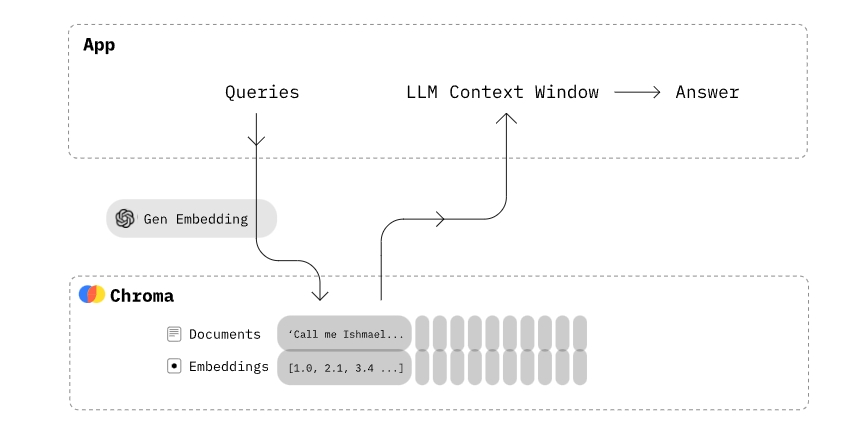
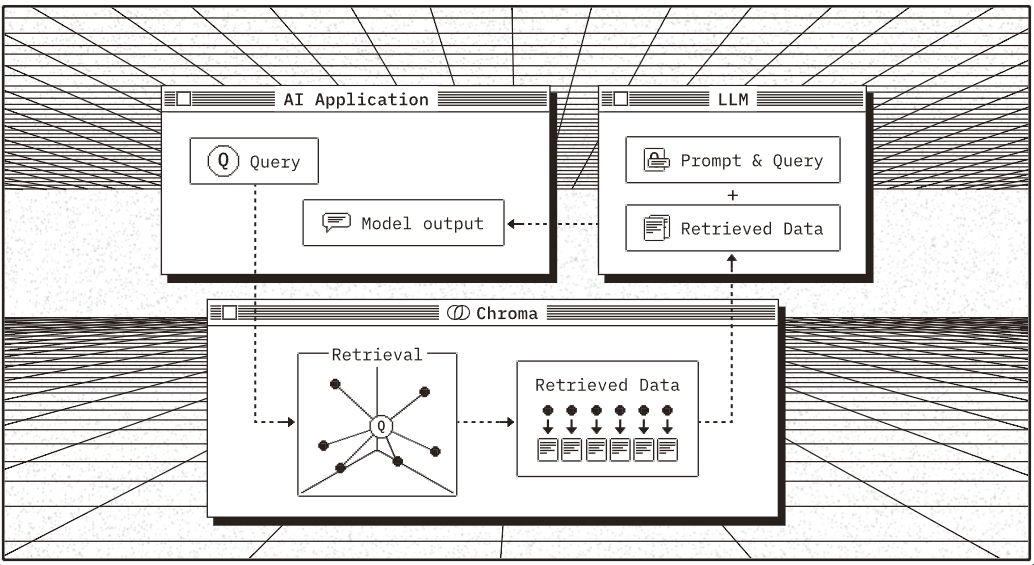
Chroma gives you the tools to:
- store embeddings and their metadata
- embed documents and queries
- search embeddings
Chroma prioritizes:
- simplicity and developer productivity
- it also happens to be very quick
Chroma 安装
$ pip insall chromadb
Chroma 使用
- 创建一个 Chroma Client
import chromadb

chroma_client = chormadb.Client()
- 创建一个 collection
Collections are where you’ll store your embeddings, documents, and any additional metadata.
collection = chroma_client.create_collection(name = "my_collection")
- 存储文本文档
collection.add(
    documents = [
        "This is a document about pineapple",
        "This is a document about oranges"
    ],
    ids = ["id1", "id2"],
)
- 查询 collection
You can query the collection with a list of query texts, and Chroma will return the n most similar results.
results = collection.query(
    query_texts = ["This is a query document about hawaii"],  # Chroma will embed this for you
    n_results = 2,  # how many results to return
)
print(result)
{
  'documents': [[
      'This is a document about pineapple',
      'This is a document about oranges'
  ]],
  'ids': [['id1', 'id2']],
  'distances': [[1.0404009819030762, 1.243080496788025]],
  'uris': None,
  'data': None,
  'metadatas': [[None, None]],
  'embeddings': None,
}
Chroma API
创建 Chroma Client
import chromadb

client = chromadb.PersistentClient(path = "/path/to/save/to")

# ------------------------------
# useful convenience method
# ------------------------------
# returns a nanosecond heartbeat.
# Useful for making sure the client remains connected.
client.heartbeat()

# Empties and completely resets the database.
# ⚠️ This is destructive and not reversible.
client.reset()
启动 Client-Server
本地启动 Chroma Server:
$ chroma run --path /db_path
本地启动 HTTP client:
import chromadb

chroma_client = chromadb.HttpClient(host = "localhost", port = 8000)
本地启动异步(async) HTTP client:
import asyncio
import chromadb

async def main():
    client = await chromadb.AsyncHttpClient()
    collection = await client.create_collection(name = "my_collection")

    await collection.add(
        documents = ["hello world"],
        ids = ["id1"]
    )

asyncio.run(main())
Collections 操作
Creating-Inspecting-Deleting
collection = client.create_collection(name="my_collection", embedding_function=emb_fn)
collection = client.get_collection(name="my_collection", embedding_function=emb_fn)
# Get a collection object from an existing collection, by name. Will raise an exception if it's not found.
collection = client.get_collection(name="test")
# Get a collection object from an existing collection, by name. If it doesn't exist, create it.
collection = client.get_or_create_collection(name="test")
# Delete a collection and all associated embeddings, documents, and metadata.
⚠# ️ This is destructive and not reversible
client.delete_collection(name="my_collection")
修改距离函数
Changing distance function
collection = client.create_collection(
    name = "collection_name",
    metadata = {"hnsw:space": "cosine"} # l2 is the default
)
Add data
collection.add(
    documents = ["lorem ipsum...", "doc2", "doc3", ...],
    metadatas = [
        {"chapter": "3", "verse": "16"},
        {"chapter": "3", "verse": "5"},
        {"chapter": "29", "verse": "11"},
        ...
    ],
    ids = ["id1", "id2", "id3", ...]
)
collection.add(
    documents = ["doc1", "doc2", "doc3", ...],
    embeddings = [
        [1.1, 2.3, 3.2],
        [4.5, 6.9, 4.4],
        [1.1, 2.3, 3.2],
        ...
    ],
    metadatas = [
        {"chapter": "3", "verse": "16"},
        {"chapter": "3", "verse": "5"},
        {"chapter": "29", "verse": "11"},
        ...
    ],
    ids = ["id1", "id2", "id3", ...]
)
collection.add(
    embeddings = [[1.1, 2.3, 3.2], [4.5, 6.9, 4.4], [1.1, 2.3, 3.2], ...],
    metadatas = [
        {"chapter": "3", "verse": "16"},
        {"chapter": "3", "verse": "5"},
        {"chapter": "29", "verse": "11"},
        ...
    ],
    ids = ["id1", "id2", "id3", ...]
)
Query
collection.query(
    query_embeddings = [
        [11.1, 12.1, 13.1],
        [1.1, 2.3, 3.2],
        ...
    ],
    n_results = 10,
    where = {
        "metadata_field": "is_equal_to_this"
    },
    where_document = {
        "$contains": "search_string"
    },
)
Where
where filters
- Filtering by metadata
- Filtering by document content
- Using logical operators
- Using inclusion operators
Updating data
collection.update(
    ids = ["id1", "id2", "id3", ...],
    embeddings = [
        [1.1, 2.3, 3.2],
        [4.5, 6.9, 4.4],
        [1.1, 2.3, 3.2],
        ...
    ],
    metadatas = [
        {"chapter": "3", "verse": "16"},
        {"chapter": "3", "verse": "5"},
        {"chapter": "29", "verse": "11"},
        ...
    ],
    documents = ["doc1", "doc2", "doc3", ...],
)
collection.upsert(
    ids = ["id1", "id2", "id3", ...],
    embeddings = [
        [1.1, 2.3, 3.2],
        [4.5, 6.9, 4.4],
        [1.1, 2.3, 3.2],
        ...
    ],
    metadatas = [
        {"chapter": "3", "verse": "16"},
        {"chapter": "3", "verse": "5"},
        {"chapter": "29", "verse": "11"},
        ...
    ],
    documents = ["doc1", "doc2", "doc3", ...],
)
Deleting data
collection.delete(
    ids = [
        "id1", "id2", "id3", ...
    ],
	where = {"chapter": "20"}
)
Chorma 部署
Chroma Server:
- Client/Server Mode
- Python Thin-Client
容器(Containers):
- Docker
- Kubernetes
云服务(Cloud Providers):
- AWS
- GCP
- Azure
Client-Server Mode
Run Chroma in client/server mode by using CLI:
$ chroma run --path /db_path
Connect to Server using Chroma HttpClient:
import chromadb

chroma_client = chromadb.HttpClient(host = 'localhost', port = 8000)
异步运行 AsyncHttpClient:
import asyncio
import chromadb

async def main():
    client = await chromadb.AsyncHttpClient()
    collection = await client.create_collection(name="my_collection")
    await collection.add(
        documents=["hello world"],
        ids=["id1"]
    )

asyncio.run(main())
Chorma’s Thin-Client
$ pip install chromadb-client
import chromadb

# Example setup of the client to connect to your chroma server
client = chromadb.HttpClient(host = 'localhost', port = 8000)

# Or for async usage:
async def main():
    client = await chromadb.AsyncHttpClient(host='localhost', port=8000)